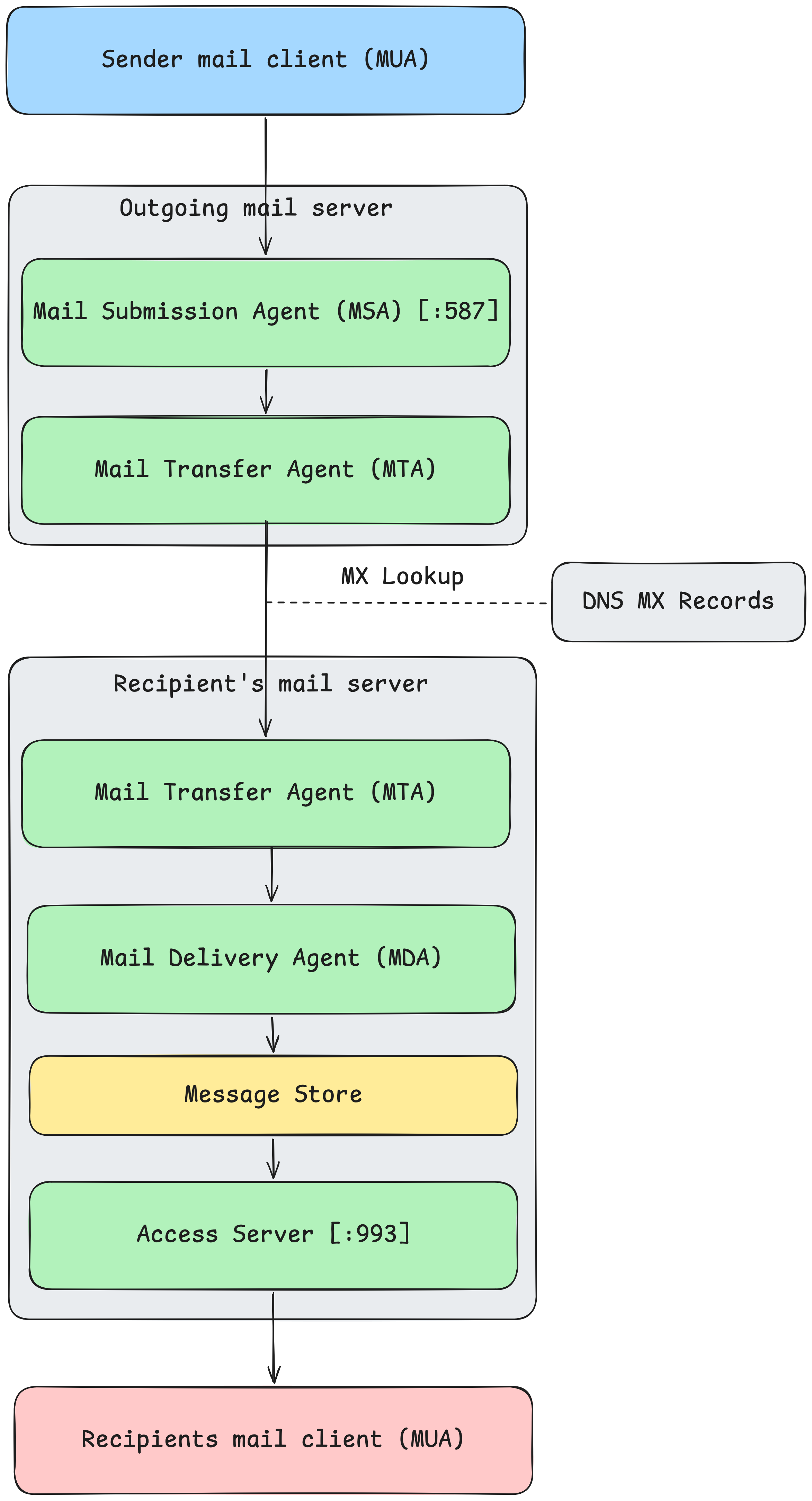
Approximately 4.9 million emails are sent and received every second, over 400 billion emails per day. Email is a very old technology, older than the Internet itself, and I've always had a somewhat hand-wavy, and potentially outdated understanding of how it works. Recently I decided to take a closer look, so here's how an email makes it from sender to receiver.
Before we start, I think it is useful to lay out the email system. There are two kinds of components in an email system: clients and servers, which form the infrastructure that delivers email messages.
587 by convention.bob@gmail.com, the outgoing mail server needs to figure out the hostname of a mail server associated with gmail.com and then resolve its IP address. DNS has a specific MX record type that tells the sending mail server which hostname receives mail for a given domain.Email uses two main standardised protocols. The Simple Mail Transfer Protocol (SMTP) defines the format of an email message, and how it is moved from a sending mail client to a receiving mail server. It defines both how a mail client sends a message to the sending mail server, and how the sending mail server sends the email message to the receiving mail server.
Reading mail that has already arrived at a recipients mail server is defined by another protocol, most commonly the Internet Message Access Protocol (IMAP) these days. IMAP requests messages from the mail server and synchronises it with the mail client. Historically, Post Office Protocol (POP) was used, which works a little differently. Email was stored on a mail server only temporarily until it was read by the client via POP, after which it was deleted from the mail server. This made more sense during an era where most people used a single computer and where server storage space was expensive.
Email as we use it today was originally designed in the 1980's. Our understanding of security has evolved somewhat since then. These days, SMTP and IMAP connections are nearly always encapsulated by TLS to ensure that nobody can intercept emails in-transit and read them. As mentioned above, DNS is also important to resolve the IP addresses of recipients mail servers via MX records.
Before anything is sent, there must be something to send. An email is just some plain text in two parts: a set of headers that describe the message, and a body that contains the message itself, with a single blank line to delimit them. An example looks something like this:
From: alice@example.com
To: bob@example.org
Subject: Lunch on Friday?

Are you free around noon?
Typically, a message is written in a desktop or webmail client, which does not deliver the mail itself. That is the job of a mail server.
There is no magic or trickery to creating a valid email. To demonstrate this, here's a few lines of Python that creates an entirely valid email message:
headers = [
    f"From: alice@gmail.com",
    f"TO: bob@gmail.com",
    f"Subject: Lunch on Friday?",
    "MIME-Version: 1.0",
    'Content-Type: text/plain; charset="utf-8"',
    "Date: Thu, 04 Jun 2026 12:00:00 +0000",
    "Message-ID: <unique-id-12345@example.com>"
]

body = "Are you free around noon?"

# Join headers with CRLF (\r\n), then add a blank line, followed by the body
# The "\r\n\r\n" is the headers-to-body separator
# CRLF is the line ending the SMTP spec requires!
raw_message = "\r\n".join(headers) + "\r\n\r\n" + body
The full raw message that is generated by this code looks something like:
From: alice@gmail.com\r\nTO: bob@gmail.com\r\nSubject: Lunch on Friday?\r\nMIME-Version: 1.0\r\nContent-Type: text/plain; charset="utf-8"\r\nDate: Thu, 04 Jun 2026 12:00:00 +0000\r\nMessage-ID: <unique-id-12345@example.com>\r\n\r\nAre you free around noon?
The main thing to note here is that it is required to use \r\n specifically to delimit new lines in an email message. This is known as a Carriage Return and Line Feed (CRLF).
In order to send the message, the client must open a connection to an outgoing mail server. All email clients and servers use SMTP to communicate.
Much like initiating a conversation, the SMTP protocol requires that specific messages be sent in a specific order to establish the connection and send the message.
First, the client must send an EHLO message. This is known as a 'handshake' message, or a 'hello' message. It is simply used to let the server know that the client exists and wishes to establish a connection. These days, encryption in transit is very important, so a StartTLS message will typically be sent to establish an encrypted connection between the client and server so that a bad actor can't intercept the message in flight.
Then the message is sent, one line at a time from the client to the server until it is finished, and the client terminates the connection.
You can write an SMTP client yourself quite easily. Python has a built-in smtplib module which makes this really easy. Here's some example code to send an email via a Gmail mail server:
import smtplib
import os
import sys

SMTP_SERVER = "smtp.gmail.com"
PORT = 587

headers = [
    f"From: alice@gmail.com",
    f"TO: bob@gmail.com",
    f"Subject: Lunch on Friday?",
    "MIME-Version: 1.0",
    'Content-Type: text/plain; charset="utf-8"',
    "Date: Thu, 04 Jun 2026 12:00:00 +0000",
    "Message-ID: <unique-id-12345@example.com>"
]

body = "Are you free around noon?"
raw_message = "\r\n".join(headers) + "\r\n\r\n" + body

with smtplib.SMTP(SMTP_SERVER, PORT) as server:
    server.set_debuglevel(1) # prints raw SMTP conversation so we can see what's going on
    server.ehlo() # handshake with the server
    server.starttls() # upgrade the connection to encrypted
    server.ehlo() # handshake again over the secure channel
    server.login("alice@gmail.com", "gmail-app-password")
    server.sendmail(args.from_addr, args.to_addr, raw_message)
First, the message is created, in the same manner as above in (1). Then an SMTP connection is opened between the client and server. First a EHLO message is sent as a handshake between client and server. Then the connection is upgraded to TLS, and the handshake is completed again, this time encrypted. Once this is done, the client can authenticate with the server. This is important, both to tell the mail server who you wish to send the email as, but also as a security mechanism so that the server doesn't send emails for a client that it shouldn't.
One thing to note about using this with Gmail is that you can't just use your Google account password to authenticate against the mail server. You will need to create an app password.
The outgoing mail server now must figure out where the recipient's mail server is to send the email message on. It does this with a DNS request for the recipient's mail server MX record. You can try this yourself:
$ dig +short MX gmail.com
20 alt2.gmail-smtp-in.l.google.com.
10 alt1.gmail-smtp-in.l.google.com.
5 gmail-smtp-in.l.google.com.
30 alt3.gmail-smtp-in.l.google.com.
40 alt4.gmail-smtp-in.l.google.com.
MX records point to the hostnames of a mail server along with a priority number. The lower the number, the higher the priority. The server will then attempt to establish a connection with each mail server starting at the highest priority. It will do this by first resolving the mail server hostname to an IP address.
With the IP address of the recipient's mail server, the outgoing server opens an SMTP connection with it, typically over port 25, which is used to transfer the message between the servers.
Because SMTP was designed in a more trusting time, it does nothing on its own to actually verify that the sending mail server is who they actually claim to be. For example, in the past I could claim to send an email from jeff@amazon.com from literally any mail server that I wished, and there was no way to verify that the mail server was permitted to send emails via amazon.com. Over the years, a few checks have been added to prevent this problem. SPF publishes a list of servers permitted to send emails on behalf of an email address. DKIM attaches a cryptographic signature to an outgoing mail, which the receiver can verify against a public key published in the domain's DNS. DMARC instructs the receiver on what to do when these checks fail, whether it should reject the message, or let it through.
Another consideration is whether I could send an email from bob@gmail.com while authenticated as alice@gmail.com? For Gmail specifically, this is not possibly because Gmail mail servers check the sending email and verify that it matches the email address that you are authenticated against. However, if you ran your own mail server, there is not necessarily anything stopping you, provided that the mail server doesn't implement this check.
Once the receiving server accepts the message, delivery is complete. The mail is written into the recipient's mailbox, a store on the mail server.
Then the recipient's mail client retrieves the waiting message using either IMAP or POP. Retrieval typically happens over port 993. Again, it is quite easy to write some code to retrieve mailbox messages via IMAP, here's how to do it with a few lines of Python:
import imaplib
import os


IMAP_SERVER = "imap.gmail.com"
PORT = 993


def parse_email(raw_bytes):
    # Emails arrive as bytes. We must decode it
    text = raw_bytes.decode("latin-1")

    return text


password = os.getenv("GMAIL_PASSWORD")

with imaplib.IMAP4_SSL(IMAP_SERVER, PORT) as imap:
    imap.login("bob@gmail.com", "gmail-app-password")
    imap.select("INBOX")

    status, message_numbers = imap.search(None, "ALL")
    ids = message_numbers[0].split()

    # Get the most recent message
    latest_id = ids[-1]

    # Fetch the full raw message. "(RFC822)" asks for the entire thing
    status, data = imap.fetch(latest_id, "(RFC822)")
    raw_bytes = data[0][1]

    print(parse_email(raw_bytes))
So from end to end, an email passes from a mail client to an outgoing mail server, across the DNS to locate its recipient, from server to server over SMTP, into the recipient's mailbox, and finally to the recipient mail client over IMAP.
If you want to try out a more complete implementation of the Python scripts created to demonstrate IMAP and SMTP in this post, you can grab the source code here: https://gist.github.com/mcandru/e09dd5c40deee76fde65f3561492ea5f.